【C#】Queue で遊ぶ
はじめに
この記事は C# その2 Advent Calendar 2018 七日目の記事です。
前回 と同じく、dotnet cli のコードを辿っていく中で見かけた、 Queue クラスについてです。
Queue クラスについて
下記のような特徴があります。
- Enqueue() で要素を追加し、Dequeue() または Peek() で追加した要素を追加した順に取り出す(先入れ先出し)。
- インデックスを指定して任意の順番の要素をとることはできない。
- Dequeue() で要素を取り出した場合は該当の要素が Queue の中から取り除かれ、 Peek() の場合はそのまま。
- Queue の中身が空の状態で Dequeue() や Peek() を実行すると InvaridOperationException 。
- TryDequeue(out T) や TryPeek(out T) を使うと、エラーを発生させずに値が取り出せる。
- IEnumerable を継承しているので foreach を使って取り出すこともできる。
- foreach や Linq を使って要素を取り出した場合、 Peek() と同じく Queue の中身は減らない。
- 非ジェネリック版も存在する。が、通常使うことはない。
- スレッドセーフではない( ConcurrentQueue を使う)
また前回の ReadOnlyCollection のようにコンストラクタで IEnumerable を渡し、その内容・順番で Queue を作ることができます。
ただし、その中身は複製されたもので、参照は別物となります。 (IReadOnlyCollection などのように元の値を変更しても影響を受けない)
SampleValue.cs
public class SampleValue {
    public string Name { get; set; }
}
Program.cs
List< SampleValue> values = new List< SampleValue> {
    new SampleValue {
        Name = "Hello",
    },
    new SampleValue {
        Name = "World",
    },
};

Queue< SampleValue> queueFromList = new Queue< SampleValue>(values);

foreach (var q in queueFromList) {
    Console.WriteLine(q.Name);
}

Console.WriteLine("change1");

values[0] = new SampleValue {
    Name = "Good"
};

foreach (var q in queueFromList) {
    Console.WriteLine(q.Name); // Hello World とそれぞれ出力される.
}

Console.WriteLine("change2");

values = values.OrderByDescending(v => v.Name).ToList();

foreach (var q in queueFromList) {
    Console.WriteLine(q.Name); // Hello World とそれぞれ出力される.
}
List の用途限定版、といった趣がありますが、どのように利用できるかを List と比較しながら見ていきたいと思います。
どう使うか
- 要素を追加した順番に取り出したいとき。
。。。いや、そりゃそうなんですけれども。
参考に、 dotnet cli (正確には CliCommandLineParser )でどのように使われているかを見てみます。
CliCommandLineParser > Microsoft.DotNet.Cli.CommandLine > Parser.cs
internal ParseResult Parse(
        IReadOnlyCollection< string> rawArgs,
        bool isProgressive) {

    var unparsedTokens = new Queue< Token>(
            NormalizeRootCommand(rawArgs)
                .Lex(configuration));

    var rootAppliedOptions = new AppliedOptionSet();
    var allAppliedOptions = new List< AppliedOption>();
    var errors = new List< OptionError>();
    var unmatchedTokens = new List< string>();

    while (unparsedTokens.Any()) {

        var token = unparsedTokens.Dequeue();

        if (token.Type == TokenType.EndOfArguments) {
            // stop parsing further tokens
            break;
        }

        if (token.Type != TokenType.Argument) {
            var definedOption =
                DefinedOptions.SingleOrDefault(o => o.HasAlias(token.Value));

            if (definedOption != null) {
                var appliedOption = allAppliedOptions
                    .LastOrDefault(o => o.HasAlias(token.Value));

                if (appliedOption == null) {
                    appliedOption = new AppliedOption(
                        definedOption,
                        token.Value);
                    rootAppliedOptions.Add(appliedOption);
                }

                allAppliedOptions.Add(appliedOption);

                continue;
            }
        }
        var added = false;

        foreach (var appliedOption in Enumerable.Reverse(allAppliedOptions)) {
            var option = appliedOption.TryTakeToken(token);

            if (option != null) {
                allAppliedOptions.Add(option);
                added = true;
                break;
            }

            if (token.Type == TokenType.Argument &&
                appliedOption.Option.IsCommand) {
                break;
            }
        }

        if (!added) {
            unmatchedTokens.Add(token.Value);
        }
    }
    if (rootAppliedOptions.Command()?.TreatUnmatchedTokensAsErrors == true) {
        errors.AddRange(
            unmatchedTokens.Select(UnrecognizedArg));
    }
    if (configuration.RootCommandIsImplicit) {
        rawArgs = rawArgs.Skip(1).ToArray();
        var appliedOptions = rootAppliedOptions
            .SelectMany(o => o.AppliedOptions)
            .ToArray();
        rootAppliedOptions = new AppliedOptionSet(appliedOptions);
    }
    return new ParseResult(
        rawArgs,
        rootAppliedOptions,
        isProgressive,
        configuration,
        unparsedTokens.Select(t => t.Value).ToArray(),
        unmatchedTokens,
        errors);
}
コマンドライン引数として渡された文字列を、引数の種類(コマンド、オプションなど)と値の組み合わせにまとめたもの( Token )の Queue を作り、それを順に解析しているようです。
Queue を使っているのは、インデックス指定で要素を取り出したり取り除いたり、 という処理を避けているためかと思います。
確かに、先入れ先出しがしたい場合、 List を使って手動で 0 番目の要素を取って、 RemoveAt(0) を実行するより、間違いも少なく分かりやすいと思います。
パフォーマンス比較
ちょっと mono に寄り道することになりますが、 Unity の Profiler を使って、 Queue と List を比較してみます。
using System.Collections.Generic;
using UnityEngine;
using UnityEngine.Profiling;
using UnityEngine.UI;

public class MainController : MonoBehaviour {

    public Button QueueButton;
    public Button ListButton;

    void Start () {
        QueueButton.onClick.AddListener(() => {
            Profiler.BeginSample("QueueSample");
            RepeatQueue(10000000);
            Profiler.EndSample();
        });
        ListButton.onClick.AddListener(() => {
            Profiler.BeginSample("QueueSample");
            RepeatList(10000000);
            Profiler.EndSample();
        });
    }
    private void RepeatQueue(int count) {
        Queue< string> textQueue = new Queue< string>();
        for (int i = 0; i < count; i++) {
            textQueue.Enqueue("hello");
            string message = textQueue.Dequeue();
        }
    }
    private void RepeatList(int count) {
        List< string> texts = new List< string>();
        for (int i = 0; i < count; i++) {
            texts.Add("hello");
            string message = texts[0];
            texts.RemoveAt(0);
        }
    }
}
各ボタンを2回ずつ押し、 Profiler の値を比較しました。

GC Alloc や速度を見ると、 List の方が良さそうですね。
RemoveAt() を別で実行している分遅いのかな、と思っていました。
要素を取り除かない場合
Queue の Peek() を使い、 List は RemoveAt() を消して、要素を取り除かない場合も比較してみました。
private void RepeatQueue(int count) {
    Queue< string> textQueue = new Queue< string>();
    for (int i = 0; i < count; i++) {
        textQueue.Enqueue("hello");
        string message = textQueue.Peek();
    }
}
private void RepeatList(int count) {
    List< string> texts = new List< string>();
    for (int i = 0; i < count; i++) {
        texts.Add("hello");
        string message = texts[0];
    }
}
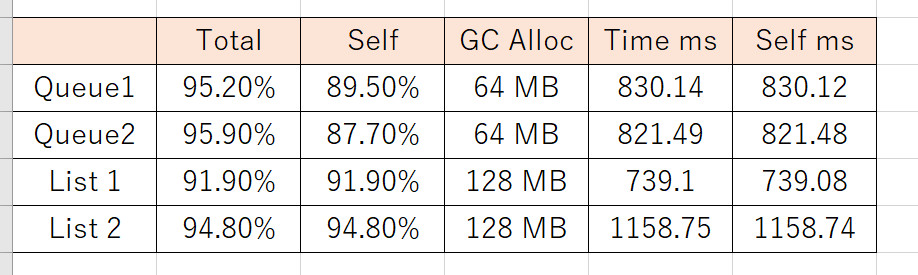
今度は Queue の方が良好な結果になっています。
ただ、実際のユースケースにおいてこれらの違いがどの程度効いてくるかというと。。。
よっぽどボトルネックになっている場合を除き、あまり気にはしなくても良いかもしれませんね。
コードを見てみる
そもそも、 Queue や List で要素を追加したり、取り出したりするとき、内部的にはどのようなことが行われているのでしょうか。
.NET Core ではこれらのクラスは .NET Core Libraries (CoreFX) として提供されています。
Queue.cs
using System.Diagnostics;
using System.Diagnostics.CodeAnalysis;
using System.Runtime.CompilerServices;

namespace System.Collections.Generic
{
    ~省略~
    public class Queue< T> : IEnumerable< T>,
        System.Collections.ICollection,
        IReadOnlyCollection< T> {
        private T[] _array;
        private int _head;       // The index from which to dequeue if the queue isn't empty.
        private int _tail;       // The index at which to enqueue if the queue isn't full.
        private int _size;       // Number of elements.
        private int _version;
        [NonSerialized]
        private object _syncRoot;

        private const int MinimumGrow = 4;
        private const int GrowFactor = 200; // double each time

        ~省略~

        public void Enqueue(T item) {
            if (_size == _array.Length) {
                int newcapacity = (int)((long)_array.Length * (long)GrowFactor / 100);
                if (newcapacity < _array.Length + MinimumGrow) {
                    newcapacity = _array.Length + MinimumGrow;
                }
                SetCapacity(newcapacity);
            }

            _array[_tail] = item;
            MoveNext(ref _tail);
            _size++;
            _version++;
        }

        ~省略~

        public T Dequeue() {
            int head = _head;
            T[] array = _array;

            if (_size == 0) {
                ThrowForEmptyQueue();
            }
            T removed = array[head];
            if (RuntimeHelpers.IsReferenceOrContainsReferences< T>()) {
                array[head] = default;
            }
            MoveNext(ref _head);
            _size--;
            _version++;
            return removed;
        }

        ~省略~

        private void SetCapacity(int capacity) {
            T[] newarray = new T[capacity];
            if (_size > 0) {
                if (_head < _tail) {
                    Array.Copy(_array, _head, newarray, 0, _size);
                }
                else {
                    Array.Copy(_array, _head, newarray, 0, _array.Length - _head);
                    Array.Copy(_array, 0, newarray, _array.Length - _head, _tail);
                }
            }

            _array = newarray;
            _head = 0;
            _tail = (_size == capacity) ? 0 : _size;
            _version++;
        }

        ~省略~
Enqueue() 、 Dequeue() と、それに関連しそうなコードを抜粋してみました。
※2018/12/27 更新
Enqueue() の時の要素数の増やし方に間違いがあったため修正しました。
× 要素数を 4 増やす -> 〇 現在の 2 倍( 2 倍にした後の要素数が 4 未満の場合は 4 )に増やす
t さん、ご指摘ありがとうございます(..)_
- 内部的には配列で値を持っている。
- 要素数( Count で返す値)は配列の要素数をそのまま返すのではなく、 _size として保持している。
- Enqueue() の時に、配列の要素数が _size と同じ場合、配列の要素数を現在の 2 倍( 2 倍にした後の要素数が 4 未満の場合は 4 )に増やす。
- Dequeue() では取り出した値を削除(デフォルト値に戻す)するが、配列の要素数自体は変更しない。
- Dequeue() で取り出す対象のインデックスは _head として保持している。
List.cs
using System.Collections.ObjectModel;
using System.Diagnostics;
using System.Runtime.CompilerServices;
using System.Threading;

namespace System.Collections.Generic {

    ~省略~

    public class List< T> : IList< T>, IList, IReadOnlyList< T> {
        private const int DefaultCapacity = 4;

        private T[] _items; // Do not rename (binary serialization)
        private int _size; // Do not rename (binary serialization)
        private int _version; // Do not rename (binary serialization)
        [NonSerialized]
        private object _syncRoot;

        private static readonly T[] s_emptyArray = new T[0];

        ~省略~

        [MethodImpl(MethodImplOptions.AggressiveInlining)]
        public void Add(T item) {
            _version++;
            T[] array = _items;
            int size = _size;
            if ((uint)size < (uint)array.Length) {
                _size = size + 1;
                array[size] = item;
            }
            else {
                AddWithResize(item);
            }
        }
        // Non-inline from List.Add to improve its code quality as uncommon path
        [MethodImpl(MethodImplOptions.NoInlining)]
        private void AddWithResize(T item) {
            int size = _size;
            EnsureCapacity(size + 1);
            _size = size + 1;
            _items[size] = item;
        }

        ~省略~

         private void EnsureCapacity(int min) {
            if (_items.Length < min) {
                int newCapacity = _items.Length == 0 ? DefaultCapacity : _items.Length * 2;
                // Allow the list to grow to maximum possible capacity (~2G elements) before encountering overflow.
                // Note that this check works even when _items.Length overflowed thanks to the (uint) cast
                if ((uint)newCapacity > Array.MaxArrayLength) newCapacity = Array.MaxArrayLength;
                if (newCapacity < min) newCapacity = min;
                Capacity = newCapacity;
            }
        }

        ~省略~

        public void RemoveAt(int index) {
            if ((uint)index >= (uint)_size) {
                ThrowHelper.ThrowArgumentOutOfRange_IndexException();
            }
            _size--;
            if (index < _size) {
                Array.Copy(_items, index + 1, _items, index, _size - index);
            }
            if (RuntimeHelpers.IsReferenceOrContainsReferences< T>()) {
                _items[_size] = default;
            }
            _version++;
        }

        ~省略~
    }
}
- 内部的には配列で値を持っている。
- 要素数( Count で返す値)は配列の要素数をそのまま返すのではなく、 _size として保持している。
- Add() 実行時、 _size が配列の要素数と同じかそれ以上なら、配列の要素数 0 の場合は 4 に、それ以外は現在の二倍に配列の要素数を増やす。
- RemoveAt() では削除したインデックスが、 デクリメントした _size 未満なら Array.Copy で取り除く。そうでなければ該当インデックスの要素にデフォルト値を入れる。
見た感じ List の方が処理が重そうな気がするのですが、要素追加時に内部の配列の要素数の増やし方で違いが出ているのかもしれませんね。
おわりに
Queue クラスは、要素を先入れ先出しでのみ取り出すことが分かっていて、かつ値を保持するタイミングと使用するタイミングが離れている場合(そうでないなら IEnumerable とかで良さそう)に一番活躍してくれるのでは、と思いました。
長々と書き連ねた意味は(私が楽しかったという以外に)なかったかもしれませんが。
ConcurrentQueue も近い内触ってみようと思います。多分。
